Wednesday, 2 April 2014

How To Mine Bitcoins

Mining bitcoins – a process that helps manage bitcoin transactions as well as create new “wealth” – is the new Beanie Babies. Luckily for us, however, bitcoins seem to be going up in value and should maintain their value over time, unlike your mint condition Tiny the stuffed Chihuahua.
But how do you get bitcoins? You can begin by buying them outright, but the market is currently wild. At $188 per coin, the direction of the bitcoin is anyone’s guess right now and, unlike equities, these things don’t split. In short, you should probably mine. But what is bitcoin mining?
Think of it as work done by groups of people to find large prime numbers or trying keys to decrypt a file. You can read a lot more about it here but just understand that for every block mined you get 25 coins or, at current rates, $4,722.25. Currently a single bitcoin is valued at $188, an alarming result that is probably caused by money movements related to Cyprus and a general bubble-like excitement over the platform in general. In fact, many wager that the DDOS attacks on many bitcoin-related services are direct action by hackers to inject instability in order to reduce the price.
As it stands, mining solo is very nearly deprecated. The process of finding blocks is now so popular and the difficulty of finding a block so high that it could take over three years to generate any coins. While you could simply set a machine aside and have it run the algorithms endlessly, the energy cost and equipment deprecation will eventually cost more than the actual bitcoins are worth.
Pooled mining, however, is far more lucrative. Using a service like “Slush’s pool” (more on that later) you can split the work among a ground of people. Using this equation:
(25 BTC + block fees – 2% fee) * (shares found by user’s workers) / (total shares in current round)
While this is simplified, it is basically how the system works. You work for shares in a block and when complete you get a percentage of the block based on the number of workers alongside you, less fees. Using this method, I have been able to raise about $1.50 over the weekend by running a dormant PC. The astute among you will note that I probably used twice that amount of electricity.
Being a neophile, I’m surprised it took me so long to start mining. My buddy Tom explained how to set up a pooled mining account so I thought it would be interesting to share the instructions.
1. Get a wallet. You can either store your wallet locally or store it online. Coinbase.com is an online wallet that is surprisingly simple to set up. Wallets require you to use or download a fairly large blockchain file – about 6GB – so downloading and updating a local wallet may be a non-starter. Like all wealth storage mediums, keeping your bitcoins “local” is probably a better idea than trusting a web service, but that’s a matter of private preference. There is no preferred wallet type and there are obvious trade-offs to both. Privacy advocates would probably say a local wallet is best.
You can download a local wallet here but make sure you keep a copy of your data backed up.
Once you’ve created a wallet, you get an address like this: 1BEkUGADFbrEShQb9Xr4pKPtM8jAyiNQsJ. This, without the period, is a direct way to send bitcoins to your wallet. Make a note of your address. In Coinbase, the wallet address found under linked accounts.
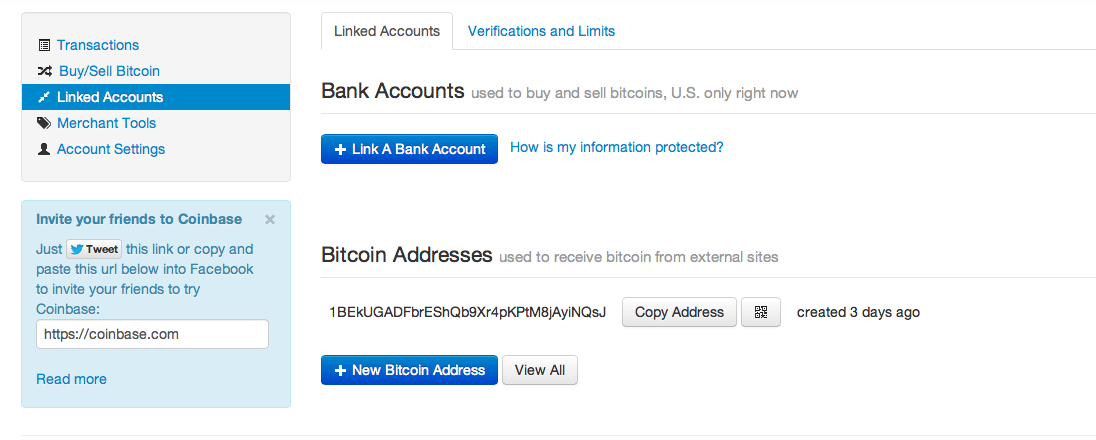
Screen Shot 2013-04-08 at 9.17.19 AM
2. Join a pool. To mine in a pool you have to work with a group of other miners on available blocks. The most popular is Slush’s Pool found here. You can also try guilds like BTC Guild as well as a number of other options. Each of the pools is characterized mostly by the fees they charge per block – 2% for Slush’s pool, for example – and the number of users. Pools with fewer users could also have a slower discovery time but pools with many users usually result in smaller payments.
How can you be sure the pool owner doesn’t steal all your bitcoins? You can’t. However, as one pool owner, Slush, notes:
In theory, as the Bitcoin pool operator, I could keep the 25 BTC from a block found by the pool for myself. I’m not going to do this, but I completely accept that people do not trust the pool operator. It is their freedom of choice, and Bitcoin is about freedom.
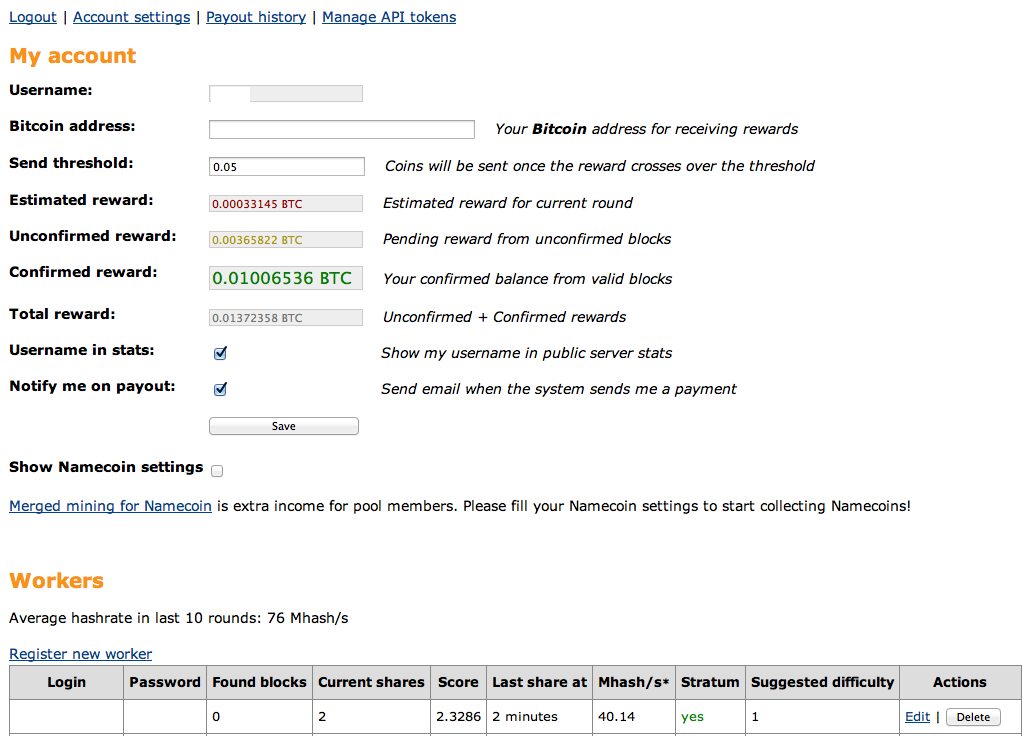
For simplicity’s sake, I’m using Slush’s Pool and have created three workers. First, create a pool login. Then add workers. The workers are sub-accounts with their own passwords and are usually identified by [yourlogin].[workername]. I have three workers running, currently – one on my iMac and two on my old PC.
Screen Shot 2013-04-08 at 3.05.25 PM
You must create workers to mine. The instructions are very straightforward for most services so don’t become overwhelmed. Like any online club, you can dig deeply into the subculture surround bitcoin as you gain experience. I like to think of it as a financial MMORPG.
Also be sure to enter your wallet address into the pool information. This will ensure you get your bitcoins.
3. Get a miner. There are a number of mining options for multiple platforms although OSX users may find themselves in a bit of a pickle. Miners use spare GPU cycles to power the mining operation, much like services like SETI@Home uses spare cycles for finding intelligent life. Miners, on the other hand, use these cycles to help handle peer-to-peer processes associated with bitcoins. Thus by doing “work” you are maintaining the network as well.
GUIMiner is the simplest solution for Windows users as it allows you to create miners using almost all standard graphics cards. You can download it here50Miner is also a popular solution. Both require you to enter your worker info and pool and they’ll start mining.
Linux users can run miners like CGMiner. An excellent guide to installing a miner on Ubuntu is available here.
OS X users can use DiabloMiner, a two-year old command-line program that will mine using OpenCL. Sadly, it uses deprecated calls to Bitcoin and is quite a bit slower. As a result, you need to run your own proxy, Stratum, that allows Diablo to connect with services like Slush’s pool. Both of these programs usually run without issue on OS X although you may need to install OpenCL for OSX.
To mine I’ve created a script that I run in Terminal that simply runs the proxy in the background and then connects Diablo. Note the last two arguments are necessary for Mountain Lion.
./stratum-mining-proxy-master/mining_proxy.py &
./DiabloMiner-OSX.sh -u WORKERNAME -p WORKERPASSWORD -o localhost -r 8332 -w 64 -na
RPCMiner is far easier to run – you simply click an icon and enter some data – and both have very rudimentary, text-based interfaces. Running Diablo on my iMac has not had much effect on application performance under OS X although it does slow down my Windows 8 machine considerably.
4. Keep your mind on your money. Bitcoins are baffling in that they are wildly simple to use and mine. Speculators, then, would probably be able to throw hundreds of machines at the problem and gather bitcoins like raindrops, right? Wrong. As more bitcoins are found, they become more difficult to find. This profitability calculator will help you understand what you’re up against but understand that this isn’t a sure thing. I’ve run my systems for a weekend and seen a mere $1.50 – enough for a coke – but other users may have improved hardware and methods to succeed. In short, if it costs more to run your hardware than you gain in bitcoins, you’re probably doing something wrong.
============================================================================
Selling Unlimited SMTP, Webmail, Mailer, RDP With AMS.

How Bitcoin Works

How Bitcoin Works
Let’s say you want to test the Bitcoin waters. The first thing you need to do as a new user is install a digital wallet on your computer or mobile device. This wallet is simply a free, open-source software program that will generate your first and subsequent Bitcoin addresses. There are three types of wallets – a software wallet (installed on your computer), a mobile wallet (which resides on your mobile device) or a Web wallet (located on the website of a service provider that hosts bitcoins).
Bitcoin uses public key encryption4 techniques for security. This means that when a new Bitcoin address is created, a cryptographic key pair consisting of a public key and private key – which are essentially unique, long strings of letters and numbers – is generated.
Each address has its own Bitcoins balance, so all you need to do is acquire a number of Bitcoins that will be held at one of the addresses in your wallet. You can acquire Bitcoins through a number of ways – by buying them from a Bitcoin currency exchange such as Mt. Gox or Bitstamp, or through a service like BitInstant that enables fund transfers between Bitcoin exchanges and supports various payment mechanisms.
Note that all Bitcoin transactions are stored publicly and permanently on the Bitcoin network, which means that the balance and transactions of any Bitcoin address are visible to anyone. Experts therefore recommend that Bitcoin owners create a new address for each transaction as a means of ensuring privacy and enhancing security.
Once you have created a Bitcoin address and have acquired Bitcoins, you can use them for an online transaction with a company that accepts Bitcoins as a payment mode. The company will send you the Bitcoin address to which you can send your Bitcoin payment. You direct the payment to that address; while the transaction takes place within seconds, verification can take 10 minutes or longer.
All Bitcoin transactions, without exception, are included in a shared public transaction log known as a “block chain”. This is to confirm that the party spending the Bitcoins really owns them, and also to prevent fraud and double-spending.
Why does transaction verification or confirmation take so long? Because the complex algorithms involved in Bitcoin mining (see description below) take time to solve, even with immense computing power at one’s disposal.
An Example of a Bitcoin Transaction
Let’s assume you want to make an online payment to a company – call it BitChamp – using 5 Bitcoins that you have in an address in your digital wallet. Here are the steps in the transaction:
  1. BitChamp creates a new Bitcoin address and directs you to send your payment to it. This creates a private key (known only to BitChamp) and a public key (available to you and anyone else). Note that just as a seller does not need to know your physical identity if you pay cash, you do not need to disclose your real identity to BitChamp and can remain anonymous.
  2. You instruct your Bitcoin client (the free Bitcoin software you first installed on your computer) to transfer 5 Bitcoins from your wallet to the BitChamp address. This is the transaction message.
  3. Your Bitcoin client will electronically “sign” the transaction request with the private key of the address from where you are transferring the Bitcoins. Recall that your public key is available to anyone for signature verification.
  4. Your transaction is broadcast to the Bitcoin network and will be verified in a few minutes. The 5 Bitcoins have been successfully transferred from your address to the BitChamp address.
Note that only the first two steps involve action by the seller and you respectively. The latter two steps are automatically executed by the Bitcoin client software and Bitcoin network. As well, storing the private key attached to an address safely and securely is of the utmost importance; otherwise, anyone who obtains the private key can control the Bitcoins at that address and use them fraudulently.
Bitcoin Pros and Cons
Bitcoin has a number of advantages:
  • As the first cryptocurrency to capture the public imagination, Bitcoin has “first mover” advantage and a head start over the competition.
  • Total issuance is limited to 21 million, so it is unlikely to be devalued because of the prospect of a massive influx of new bitcoins.
  • As a decentralized currency, Bitcoin is free from government interference and manipulation.
  • Transaction costs are much lower than with conventional currencies.
On the flip side, Bitcoin’s disadvantages include:
  • The price of a Bitcoin has been increasingly volatile, making it difficult to assess its real value and increasing the risk of losses for investors in the cryptocurrency.
  • The relative anonymity of Bitcoin may encourage its use for illegal and illicit activities such as tax evasion, weapons procurement, gambling and circumvention of currency controls.
  • The fact that bitcoins exist primarily in digital form renders them vulnerable to loss.
Conclusion
Bitcoin has made significant progress in its adoption and usage since it was unveiled in 2009. Its evolution over the next few years will determine whether this leading cryptocurrency will become an integral part of the global financial system, or whether it is destined to remain a niche player.
Definitions and Key Concepts
Cryptography refers to the practice and technique of using encryption for secure communication and transmission of data and information.
2 In a P2P network, a group of computers is connected to enable the sharing of resources and information by users, and there is no central location for the network. This is diametrically opposed to a typical client-server network, where the central server controls the level of access by users to shared network resources. Popular applications of the P2P concept are Skype and file-sharing services such as BitTorrent.
Bitcoin mining refers to the computationally-intensive task of generating Bitcoins. While any computer can be put to the task of Bitcoin mining by using a free mining application, in reality a great deal of computing power is required to solve the extremely complex algorithms involved and to share those solutions with the entire Bitcoin network. The mining process is quite complicated and involves advanced concepts such as cryptographic hashes and nonces.
In simple terms, Bitcoin miners use powerful computers to track and compile pending Bitcoin transactions every 10 minutes into a new block. These miners then set to work doing the intensive number-crunching required to verify all the transactions in the block. This is a competitive process, and the first miner to solve the algorithms and verify the transactions transmits the results to the entire Bitcoin network. Upon confirmation by the rest of the network, the block is then added to the block chain. Each block includes a certain number of Bitcoins in a “coinbase” transaction that is paid out to the successful miner. This reward was set at 50 Bitcoins when the system first commenced operations in 2009, but was halved to 25 Bitcoins in November 2012, and will reduce by 50% approximately every four years.
Public key encryption combines a public key and a private key. While the public key is available to anyone, the matching private key is stored securely in the digital wallet and is generally password-protected. Each Bitcoin transaction is signed by the private key of the initiating user, providing mathematical proof that it has indeed originated from the owner of the address, and preventing the transaction from being altered once it has been issued. Since the key pair is mathematically related, any data or information encrypted with a private key may only be decrypted or deciphered with the corresponding public key and vice versa.
Double-spending means spending the same digital currency twice, something that is impossible with physical currencies.
============================================================================
Selling Unlimited SMTP, Webmail, Mailer, RDP With AMS.

BitMinter

What is BitMinter?

Bitminter is a mining pool that aims to make it easy for anyone to make bitcoins. Everyone should have the opportunity to take part in the currency revolution that is Bitcoin. We create new bitcoins and help process transactions. If you take part in this work then you will get your share of the coins we create and the income from transaction fees.

What do I need?

Making bitcoins with a normal computer is not profitable due to electricity costs. But if you have a good graphics card you can try it to learn how things work while you decide whether to buy ASICs. Bitcoin ASIC devices is efficient hardware for making bitcoins. The Bitcoin wiki has a comparison of hardware

Getting Started


2. Bitminter client: Hit the start button to start Bitminter client. You get bitcoins for the work it does. Works on Windows, Linux and Mac. Requires updatedJava

Other clientsbfgminercgminer, etc. Connect to the pool at stratum+tcp://mint.bitminter.com:3333 (Stratum) or http://mint.bitminter.com:8332 (GBT or getwork). As user name put your Bitminter user name, an underscore, then a worker name, e.g. DrHaribo_asic3. In case you have firewall issues, port 443 and 5050 (Stratum) and 80 (GBT/getwork) are also available. Any password is accepted.
3. Get a wallet to transfer your coins to. Make sure you secure your wallet.

Reward System


Your work is recorded in shifts. When we create a new block you get a share of the income proportional to how much of the work in the last 10 completed shifts is yours. This reward system is known as PPLNS with shifts. From 2013.04.20 onwards there is a 1% fee on mining income.
Not only new coins are paid out but also income from transaction fees. To increase income further we also generate namecoins, which take no extra effort. You can read more about namecoins at dot-bit.org.
============================================================================
Selling Unlimited SMTP, Webmail, Mailer, RDP With AMS.

Tuesday, 1 April 2014

BITCOIN DEBIT CARD / ANONYMOUS CREDIT CARD


Receive an Anonymous Credit Card for Withdrawing Bitcoin
-       Can I withdraw cash with my bitcoin wallet?
Yes.
-       Does it work for  all country anywhere in the world?
Yes. All countries permitted, including India, Pakistan, China, Iran, North Korea and Nigeria.
-       How much does it cost?
The card is FREE if you process $3500 USD through the card. We collect a deposit
of 0.20 btc on the card, which is refunded once you withdraw a total of $3500 USD
in a one year period.
-       Where is my ATM card pin?
We send your pin by email.  It is NOT your account pin in security settings
-       My card is blocked, what can I do?
If you enter the wrong PIN three times at the ATM, your card will get blocked.  In
this case, there is nothing we can do. You will have to call the bank to attempt to
unblock your card, which might or might not be successful.
-       Can I transfer funds from  My Card to BitPlastic?
Absolutely not. Once you have sent funds to your card, they cannot be transferred
back to BitPlastic. If you lose your card, there is no way to recover the funds.
-       What are the fees?
We charge a conversion fee from Bitcoin to send cash to your card. ATM usage fee
is minimal, about $1.50 per transaction.
-       What price for BTC do I get?
We sell your BTC to load cash to your card, and we base the price on BTC-e bid
price.
-       I lost My Card, What now?
The money on the card is gone forever.  You can email support and recover your
card number, which you can use online to spend the money, but you will not be able
to withdraw the cash.
-       When does the conversion Occur?
The conversion from BTC to cash occurs when we process your withdrawal
request. We process withdrawals daily, but due to the small delay between when
you submit the request and when we process it, the price of Bitcoin may have
moved.  In this case, you might get a little more or a little less loaded to your card,
depending on whether Bitcoin goes up or down after you add funds to your card. 
Card loads are processed daily, so the price movement between your withdrawal
and the processing will be small.
-       When will I receive my bitcoin debit card?
Depends where you live. Cards typically arrive in 2-3 weeks. Online banking for the
card is provided sooner.
-       How much cash can I  withdraw daily?
You can withdraw up to $200 USD daily. If you need to withdraw more than that,
you can order multiple cards.
-       Are the debit card anonymous?
Yes. There is no credit check, no paperwork, no application process, and no
verification info required!
-       Can I use the bitcoin visa online?
Yes. However, some websites might decline it because of name verification issues.
-   Can I use the bitcoin visa at point –of- sale terminals to buy stuff in person?
Absolutely. The point-of-sale limit is $1000 daily.
-       Does the card have maximum yearly limit?
Yes, the maximum amount that can be loaded on the card in a one-year period if
$3500 USD. However, you can simply request a new card after you hit the limit, so
in practice there is no real limit. You can also request multiple cards.
================================================
Selling Unlimited SMTP, Webmail, Mailer, RDP With AMS.

Buy Bitcoins with Paypal

Things you should know before we get started:
  • Because of chargeback risk Virwox is taking on themselves they are limiting the amount you can deposit initially through Paypal or a credit card, here are the exact limits according to their website from December 21th 2013.
virwox limitations
  • This process hold within it more transaction fees than usual. This may still be a valid solution since the soaring numbers of BTC compensate for this. It’s important for you to be aware of the different transaction fees.
  • Since December 2013 VirWox is delaying new user transactions for up to 48 hours. This means that it can take you 2 days to complete this process (still way faster than using a wire transfer)
If you find yourself getting stuck at any point don’t hesitate to contact me through the contact form on the site.

Step 1: Go to VirWox.

VirWox is an exchange of virtual currency, you can buy there Lindens, Bitcoins, and more…

Step 2: Open a free account

Click on the “not registered yet”  on the top of the left sidebar to open up a new account as shown here:
buy Bitcoin with paypal - open account

Step 3: Fill out our personal details

Fill out your username and email address. Where it asks for “avatar name” just leave it at “No Avatar”,  it  doesn’t matter, since you’re not going to play Second Life.
buy Bitcoin with Paypal - fill details
Continue filling out all of the personal details and click “register”.

Step 4: Activate your account

Once you clicked “register” you will get an email confirmation with your password. Open the email, copy the password and log back into VirWox.

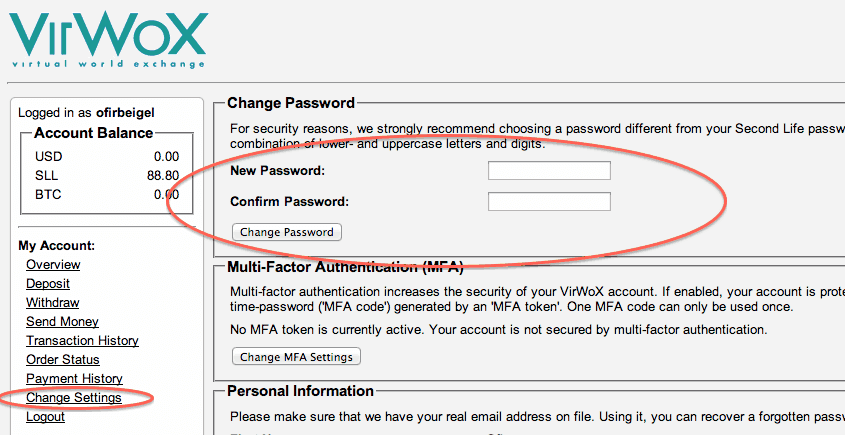
Step 5: IMPORTANT!!! Change your password!

After clicking the confirmation link it is advised you change you password as shown below since you will be transferring money through this site.
buy Bitcoins with Paypal - change password
Do not worry about the message saying “Your avatar connection has not been validated yet” – it is irrelevant.

Step 6: Fund your account through PayPal

Click on deposit on the left side and choose PayPal Express. Fund the account with how many USD you’d like.
Buy Bitcoins with Paypal - fund account
Note: From now on for each transaction you will make there will be a fee – make sure you are aware of the relevant deposit and withdrawal fees.

Step 7: Buy SLL with USD 

Go to Exchange->USD/SLL on the left side. You can also go to any other currency you’d like. Buy SLL (which mean Second Life Lindens) . We will later on exchange these SLL to Bitcoins.
USD/SLL exchange Bitcoin
Note: If you haven’t made a deposit yet you will get the screen shown above requesting you to deposit before you buy SLL.

Step 8: Buy BTC with SLL 

Once you have SLL in your account, go to the BTC/SLL and buy Bitcoins with your SLL.
Buy Bitcoins with SSL
Important!!!
Sometimes a manual review will be required by VirWox after this step. This can take up to 48 hours but usually takes around 6 hours.

 Step 9: Withdraw your Bitcoins

Choose “Withdraw” on the left side and send the Bitcoins to your wallet.
How to withdraw Bitcoins

================================================
Selling Unlimited SMTP, Webmail, Mailer, RDP With AMS.